

AI-powered quoting and pricing engine that enables freight forwarders to respond faster, quote smarter, and win more deals. The platform digitizes routing, pricing, and quoting while integrating into existing systems and workflows.
Every morning, freight forwarders and pricing representatives (FFPRs) face an overflowing inbox of quote requests. They need to:
1. Triage quickly: Which requests are high-value opportunities ("diamonds") worth prioritizing? Which are routine?
2. Quote fast: Once identified, how quickly can they respond with a competitive rate?
But both steps are broken.
Problem 1: Triage Overload
FFPRs receive dozens of emails daily. Scanning through each one to identify which are valuable opportunities vs. routine,
low-margin, or already-quoted-is cognitively exhausting. Without clear prioritization, high-value deals get buried in the noise.
Result: Diamonds get treated like routine work. Time is spent on low-priority requests while real opportunities slip by unnoticed.
Problem 2: Slow Quote Creation
Even when an opportunity is identified, generating a quote is slow:
- Extract request details from email.
- Hunt for carrier rates across multiple sources (carrier websites, agent contacts, large Excel files).
- Manually compile and verify.
- Send back to customer.
Average turnaround: 4-24 hours.
In a competitive market, slow quotes lose deals. Customers go with whoever responds first with a competitive rate.
Result: Even identified opportunities are lost because the response is too slow.
1. Lost deals due to slow response time.
2. 20–30% of team time wasted on manual rate lookup.
3. Scaling bottleneck as deal volume grows.
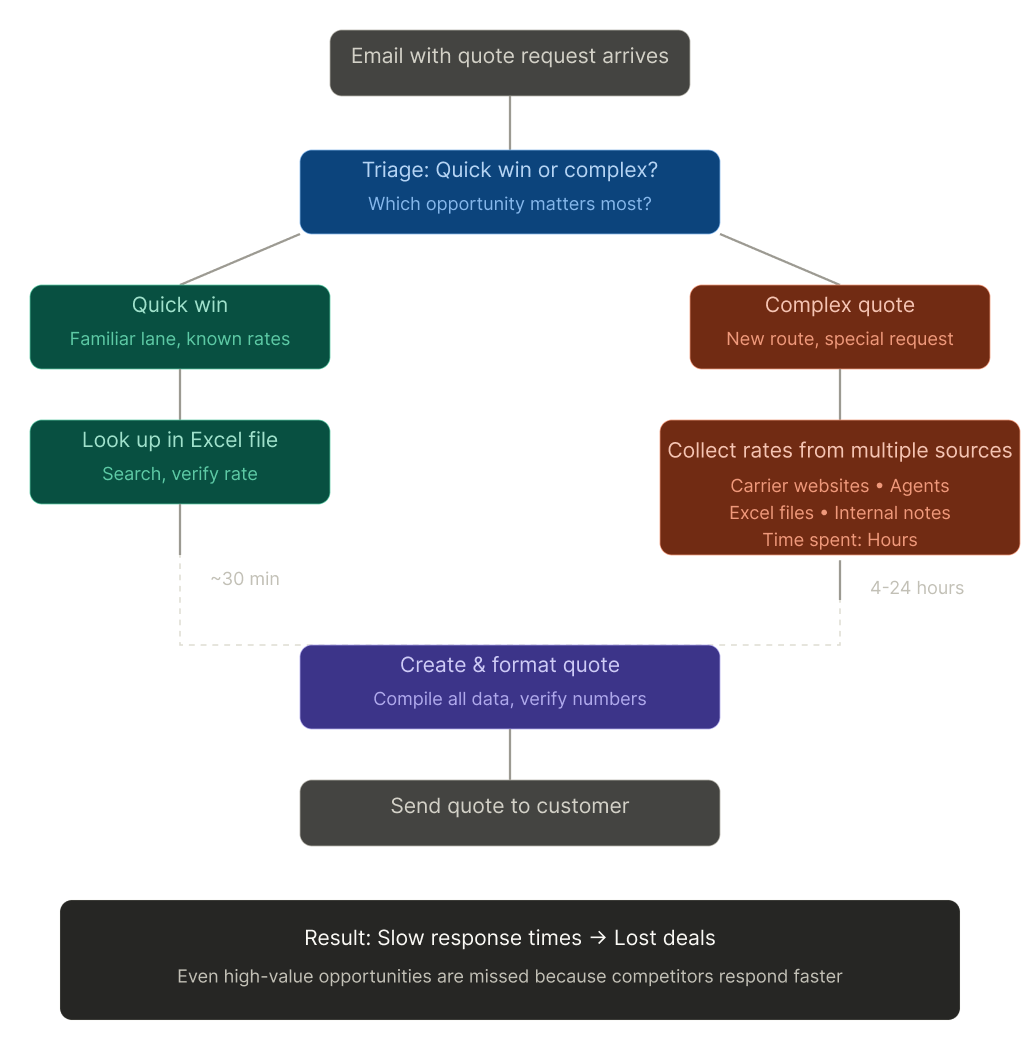
Before designing anything, I needed to understand how freight pricing reps actually work.
I [spent two weeks in conversations with N FFPRs - interviewing them and watching them triage their inboxes and build quotes in real time].
Three things came up in almost every session:
"I'm drowning in my inbox."
Reps open dozens of RFQs a day and burn mental energy just deciding which ones are worth quoting. As one put it: "[By the time I get to the good ones, half my morning is gone.]"
"The rates are everywhere."
Pricing lives across spreadsheets, carrier portals, emails, and PDFs.
Reps described hunting through 4–5 sources for a single quote - and second-guessing whether the rate they found was still valid.
"By the time I respond, the deal's cold."
Turnaround ran 4–24 hours. Slow replies meant lost business, and reps knew it.
Elena — Freight Pricing Rep, Rotterdam
Job to be done: "When an RFQ lands, help me decide in seconds whether it's worth my time - and quote it before a competitor does."
Goals: respond fast, find the best rate, protect her margins.
Frustrations: rates scattered across systems, RFQs lost in a crowded inbox, no easy way to tell if a rate has gone stale.
What success feels like: clearing the inbox by mid-morning with confidence she didn't miss a high-value deal.
Exploring Interaction Patterns: Where Does Control Live?
Iteration 1: Visual & Hierarchy Variations
Testing different visual treatments of the AI recommendations panel. How do we make the AI suggestions feel helpful, not overwhelming? We explored color, spacing, and typography to establish visual hierarchy.
Iteration 2: Action Placement - Inside vs. Outside the Component
We tested where actions should live. Should "Generate Quote" and "View Alternatives" be inside the AI panel, or separate buttons outside? Putting them outside felt fragmented—users didn't understand which actions belonged to which data. The panel lost its coherence.
Iteration 3: Actions as Part of the Component (Final)
We moved all actions inside the AI component. This solved two problems at once:
Transparency: The component becomes a self-contained unit—all the AI reasoning + the user's decisions to act on it, together.
Control: By keeping actions within the component, we reinforced that the user reviews then chooses—not just accepting the AI's recommendation.
Result:
Faster decision-making (no cognitive load jumping between UI elements) + clear sense of user agency (the user always decides).


Daily Design Reviews with Product
We held daily live critique sessions with the PM. This wasn't a review-and-wait situation-it was real-time feedback, iteration, and shared ownership. Each morning, we'd review what shipped the day before, discuss blockers, and align on the day's design priorities. This cadence kept us moving fast without losing alignment.
Navigating Performance & Data Constraints
Early on, we hit a hard constraint: the system couldn't fetch real-time carrier rates efficiently without impacting performance.
Loading all possible rates upfront would slow the interface to a crawl. Data availability was unpredictable across sources.
Rather than design around a perfect world, we designed within real limits:Simplified the UI: Instead of showing every possible option, we surfaced the top 3 recommendations (based on algorithm confidence). Users could still "View Alternatives" if they wanted more.
Phased the approach: We launched with the essentials (triage + auto-quote generation), then added real-time optimization in phase 2 once the infrastructure scaled.
Why this mattered: This constraint actually improved the design. By forcing simplification, we made faster decisions feel more trustworthy, not overwhelming users with 20 options they couldn't evaluate anyway.
Early User Validation
The co-pilot launched to our initial user group. The response was immediate and enthusiastic.
This 1:30 minets clip shows the complete workflow in action: identifying a high-value quote request, reviewing the AI summary, generating a quote, and sending it to the customer. What used to take 4-24 hours now takes minutes.
Users are experiencing the transformation we designed for. A task that took a full day now takes 15 seconds. That's not just speed - that's a fundamental shift in how FFPRs spend their day.
Ben: "So what just happened in 15 seconds took you hours."
Patricia: "It took me a day... It literally did." Now it's 15 seconds.
Katie: "We would be glad to put our names under that. Testimonials, 100%."
Kenneth: "Wisor will help Patricia's mental health as well. Like, that's a lot."
Quote creation time reduced from 4-24 hours → ~15 minutes (in early usage) - turning a task that blocked reps for most of a day into something they finish in minutes.
This wasn't just a speed gain. By keeping reps in control of every AI recommendation, the system changed how they spend their day — from chasing rates across spreadsheets and portals to reviewing, deciding, and sending.
We're tracking adoption across the full team and measuring how the system scales.
Early signs: this isn't a niche tool-it's addressing a fundamental workflow problem that affects everyone.
If you like what you see and want to work together, get in touch!
gillyraz@gmail.com